
Planet Coaster 2 Forge Utils: Install and Setup Guide
Set up Planet Coaster 2 forge utils with ACSE, find the right mod folder, fix extraction mistakes, and understand compatibility before adding custom rides.
Jump to
What Is ForgeUtils in Planet Coaster 2?
A custom coaster download can depend on more than its own files. If a mod requires Planet Coaster 2 forge utils, you need ForgeUtils and its required dependency, ACSE. Installing both gives that mod access to the shared tools it needs.
ForgeUtils is a utility mod for creating code mods, editing game databases, and adding custom content. Its tools support custom scenery, coaster types, and Custom Tracked Rides, often shortened to CTRs.
For players, its main role is supporting other mods. For developers, it provides:
- Database editing utilities: Make code-based changes through a stable API.
- Custom content builders: Work with custom scenery and tracked rides.
- Prefab utilities: Handle prefabs when developing content.
- Logging tools: Add custom logging to mod code.
Install ForgeUtils when a mod lists it as a requirement. It supplies development tools; the separate content mod supplies the ride, scenery, or gameplay feature you want.
Official page: Planet Coaster 2 (planetcoaster.com)
How to Install ACSE and ForgeUtils
These manual installation steps apply to the Windows Steam version. Console versions cannot use this PC mod installation method.
 Image: Steam / Frontier Developments
Find the Mod Folder
- Open Planet Coaster 2 in your Steam library.
- Select the gear icon, then Properties.
- Open Installed Files and select Browse.
- Enter the
win64folder, thenovldata.
Using Steam’s Browse button takes you to the correct installation even when your library lives on a different drive.
Extract the Required Files
- Download the ACSE and ForgeUtils archives using their manual download options.
- Extract the archives with an archive utility.
- Place the actual mod folders inside
ovldata, preserving their internal files and folder structure. - Follow the installation instructions for the dependent mod before adding its files.
Watch for an extra outer folder. Extracting an archive into a folder named after the download can bury the actual mod directory another level down. Open that outer folder and move the intended mod folder into ovldata.
Do not leave the mod inside its ZIP archive. Avoid rearranging the game’s existing folders while adding downloaded content.
Check the Installation in Game
Launch the game and look for the ACSE build indicator in the upper-left corner of the main menu. Then open a new park and try the feature supplied by your dependent mod.
Use those checks in sequence: check that ACSE loads, then test the custom content or tool you installed.
Which ForgeUtils Version Do You Need?
ForgeUtils 2.7.0, released September 10, 2026, adds new Lua hooking APIs and a keybind interface. Earlier releases include changes that matter when matching dependencies:

- 2.6.0: Updated for Update 11, with database schema changes and builder additions.
- 2.2.0: Updated for game version 1.10, adding code constants and small database-binding changes.
- 2.0.2: Fixed UI-hooking issues encountered during Enhanced Move Tool testing.
- 2.0.0: Added Custom Tracked Ride building utilities and switched Lua hooking to lazy loading.
Check the version requirements of the mod you want to use. A mod that needs newer APIs needs the corresponding ForgeUtils release, even if an older installation still works with your existing content.
For developers, the documentation includes guides, database schemas, and API references generated from Lua type annotations. Use the documented functions for your installed release when building a mod.
Fix Missing Mods and Crashes
Start with the dependency chain and extraction layout when a mod fails to appear or crashes while placing content.
- Check ACSE first. ForgeUtils relies heavily on its functions.
- Check the required ForgeUtils version. Match it to the dependent mod’s requirements.
- Inspect the extracted folders. Move the actual mod directory out of any extra download wrapper.
- Check the content mod’s compatibility. Updating ForgeUtils alone does not update the separate ride or tool.
- Follow each mod’s installation instructions. The
ovldatamethod does not apply to every kind of modification.
Separate base-game ride behavior from installation problems, too. Update 11 Hotfix 15, released August 25, 2026, changed several ride features:
| Ride | Hotfix change |
|---|---|
| Studio Tour and Re-Motion | Added Load/Unload Stations |
| Fourth Wall and Cinema | Fixed custom music playback |
| New-Gen Flying Coaster | Added brakes and drive tires to left loading stations |
Check your game version when troubleshooting those specific behaviors. For a mod that crashes on placement, inspect its extraction layout and dependencies before changing unrelated game files.
Continue with
 Planet Coaster 2 Mods: Workshop and Custom Content GuideExplore Planet Coaster 2 mods, Workshop creations, and custom scenery. Learn what changes your park, what changes its visuals, and what updates can fix.
More in Mods
See all Mods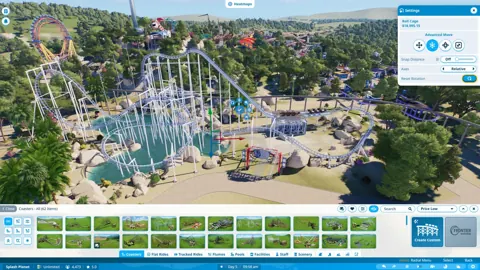
Continue exploring

Planet Coaster 2 Workshop: Find, Test, and Share Builds
Explore the Planet Coaster 2 workshop to find community rides, use share codes, compare coaster stats, and learn building tricks before sharing your own.
Planet Coaster 2 Franchise Mode Explained: Play Guide
Planet Coaster 2 franchise mode explained: learn how to create or join a franchise, share park edits, handle editing locks, and compete on leaderboards.
Join the community
Official channels for news, updates and player help: